


InfoPhone logo
HomeAbout usFAQ
Login/ Signup
Get it on Google PlayDownload on the App Store
InfoPhone logo

Connect. Call. Communicate.Anywhere, Anytime.

Quick Links

  • Home
  • About us
  • Help Centre
  • FAQ's

Features

  • Group Chats
  • Send Reactions
  • Personalised Profiles
  • Share Seamlessly

Also available on

  • Get it on Google Play
  • Download on the App Store

© Enso Webworks Private Limited 2026. All Rights Reserved.

  • About Us
  • Privacy Policy
  • Terms & Conditions
  • Legal & User Agreement
  • Community Guidelines
  • FAQs
Help Centre/Messages/Leaving a group

Leaving a group

You can leave a group at any time without needing an admin’s permission.
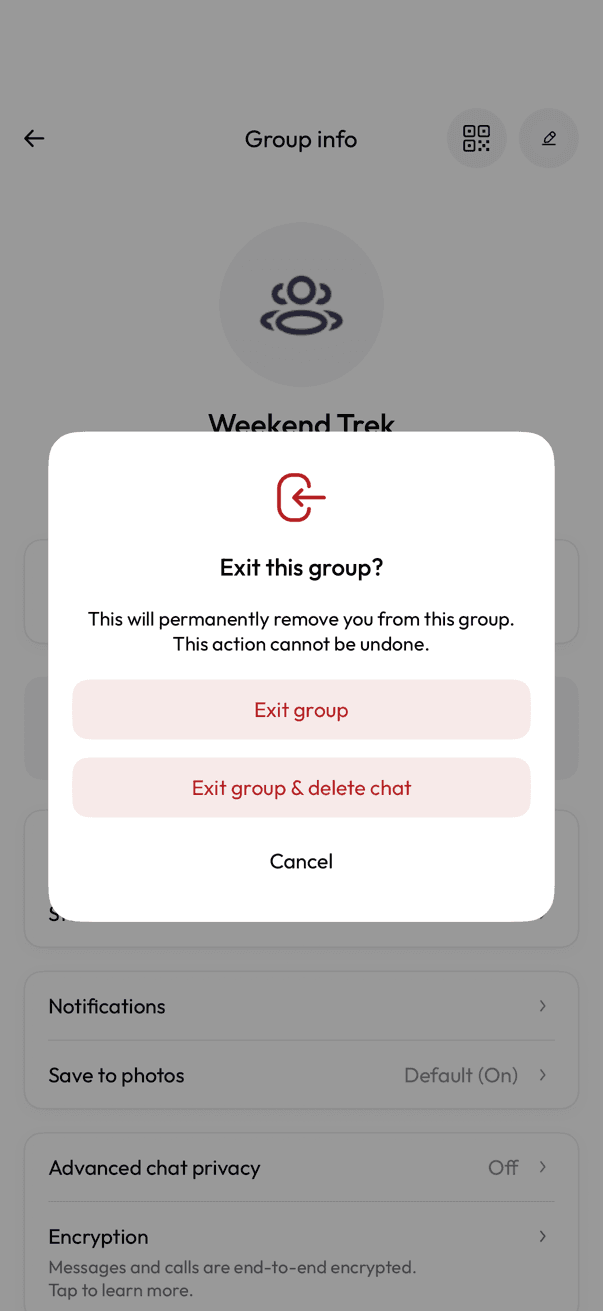
Exit this group confirmation with Exit group and Exit group & delete chat options
Confirm you want to exit
  1. Open the group and tap its name to open Group info.
  2. Scroll down and tap Exit group.
  3. Choose Exit group to leave and keep the chat, or Exit group & delete chat to leave and remove it from your phone too.

After you leave

  • Everyone in the group sees that you left.
  • You stop receiving its messages.
  • Exit group keeps the chat on your phone; Exit group & delete chat removes it as well.
  • An admin can add you back unless you also deleted the chat.

Related articles

  • Creating a group
  • Adding and removing participants
  • Group admin controls

Was this article helpful?

On this page

  • After you leave

Was this article helpful?